
The whole day, not just the keyboard
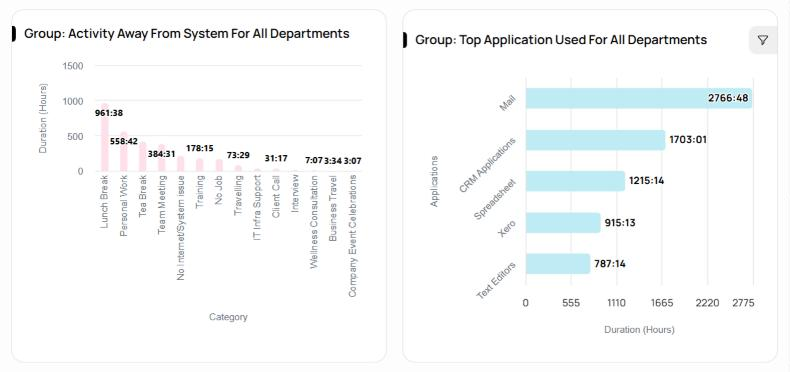
Meetings, phone work and site visits are real work. Away-from-system time is classified rather than penalised, which suits phone-heavy and hybrid teams.
Workforce analytics
BeActive measures the whole working day across teams, shifts and sites (time, workload, activity, applications and attendance) and gives leaders, managers and the people being measured the same view of it.
01BeActive
Attendance and output are easy to report. The hours in between are where cost, capacity and risk actually sit, and where every staffing and billing decision quietly goes wrong.
BeActive separates active time from idle time from time away from the system, so the difference stops being invisible. It looks for patterns, not a daily leaderboard.
02Product tour
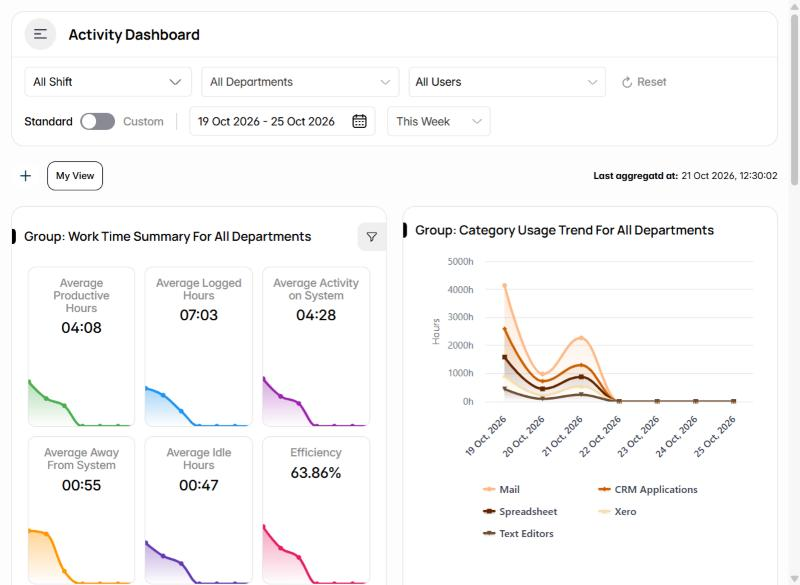
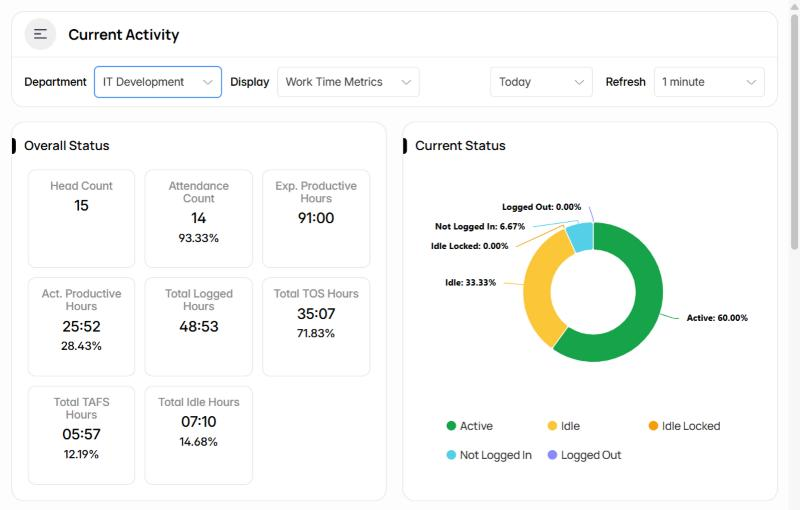
Real screens from BeActive running at Befree. Names and photos are hidden.
03BeActive
Meetings, phone work and site visits are real work. Away-from-system time is classified rather than penalised, which suits phone-heavy and hybrid teams.
On by default and not removable, with a visible indicator whenever the agent is running. There is no covert mode.
Rotating shifts, split shifts, multiple sites and separate time zones are first-class, not a spreadsheet bolted onto a timer.
04How it works
Roll the agent out with your existing MDM, or let people install it themselves.
Tracking starts at login. Nobody has to remember to press anything.
Active, idle, meeting and away time separated against your own thresholds.
Weekly and monthly patterns, not a daily leaderboard.
05BeActive
Automatic hours per person, project and shift.
Active versus idle versus away, with thresholds you set.
Daily summaries, trends, exceptions and scheduled email reports.
Usage grouped into productive, neutral and non-work categories you control.
Shifts, late starts, leave and approved timesheets from tracked activity.
Who is overloaded and who has room, across teams, processes and sites.
Who is on shift, active, idle or away right now, against the roster.
Per-person and custom reports, exported or delivered on a schedule.
Activity classification, rating scales and department targets.
06BeActive
Shift adherence, occupancy and audit-ready records across sites and shifts.
Where the hours actually go, by person, team and client.
A fair, consistent view of the day across time zones.
Focus time, meeting load and context switching for planning.
07BeActive
It records that input happened, never what was typed. There is no setting to turn it on.
These have been asked for and declined.
The agent is always visible to the person being measured.
Off by default, set per team and disclosed whenever active.
FAQ
Short answers to common questions.
Talk to a specialist. We reply within one business day.
Ask us a questionor call 1300 873 733In most places, monitoring work activity on company equipment during working hours is lawful when employees are informed. The notice and consent required varies, so check your obligations for each country you employ in. This is not legal advice.
No. It records that input activity occurred, never what was typed.
Yes, by default. Every person sees the same day and week view their manager sees.
A lightweight desktop agent for Windows and macOS, deployed manually or through your MDM or Group Policy. A typical team is live the same day.
In AWS, in the region matching the country you register from, encrypted in transit and at rest.
Per active user per month across four plans, with a discount for annual billing. Contact us for current pricing.
Compliance
Befree is ISO 27001 certified and GDPR compliant. We handle personal information under the Privacy Act 1988 and the Australian Privacy Principles, and under UK GDPR for UK clients. Sensitive fields, such as tax file numbers, are masked before they reach any AI model. Every AI workflow keeps a person reviewing decisions that touch a ledger, a client or a lending outcome.
Next step
A 20-minute walkthrough using your team structure, not a canned demo.